Colla: A Handwritten Font for Elegant Web Design
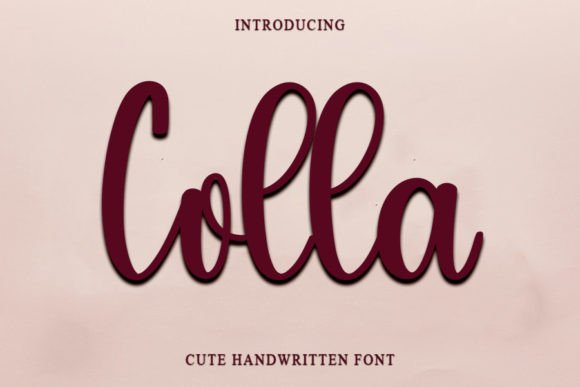
As a web designer, I'm always on the lookout for fonts that can add a touch of elegance and personality to my projects. Recently, I came across Colla, a neat and beautiful handwritten font with an elegant touch. I decided to test it out in a real website layout, and I must say, Colla did not disappoint.
Visual Characteristics and Personality
Colla is a premium font that exudes a timeless and distinct style. Its handwritten charm adds a personal and inviting feel to any design. The font's clean lines and graceful curves make it perfect for creating a sophisticated yet approachable look. Whether you're designing a boutique online store, a coaching website, or a creative portfolio, Colla can help set the right tone.
Testing Colla in Real Web Layouts
I started by using Colla in the hero section of a boutique online store. The font's elegant touch immediately elevated the overall aesthetic of the page. The header, "Welcome to Our Boutique," looked stunning, drawing the visitor's eye and setting a luxurious and welcoming mood. I also tested Colla on mobile screens, and it maintained its readability and visual appeal, which is crucial for a responsive design.
Readability and Visual Hierarchy
One of the key aspects of any font in web design is its readability. Colla performs well in this regard, especially for larger text such as headings and call-to-action areas. In the hero section, the font was easy to read and added a sense of sophistication. However, for smaller text and body copy, I found that Colla might be too decorative. For these areas, I paired Colla with a clean sans serif font, which provided a good balance and improved overall readability.
Using Colla in Different Web Elements
Beyond the hero section, I experimented with Colla in various other elements of the website. Here are some practical examples:
- Section Headings: Colla worked beautifully for section headings, adding a touch of elegance and guiding the user's attention through the page.
- Call-to-Action Buttons: Using Colla for CTA buttons made them stand out and feel more inviting. However, I made sure to keep the button text short and clear to maintain readability.
- Logo Text: Colla's unique style made it a great choice for logo text, giving the brand a memorable and distinctive look.
- Image Overlays: Placing Colla over image banners and overlays created a visually appealing and cohesive design, enhancing the overall brand identity.
Font Pairing and Design Assets
To ensure a balanced and professional design, I paired Colla with a simple sans serif font for body copy and longer text. This combination allowed Colla to shine in its decorative role while maintaining readability and a clean, modern look. Additionally, I used Colla for decorative accents and supporting typography, such as subheadings and captions, to add a touch of flair without overwhelming the design.
Webfont Availability and Licensing
Before using Colla in client projects or live websites, it's important to check the included styles, webfont availability, file formats, and commercial licensing. Colla offers a range of alternates, ligatures, and weights, which can be very useful for creating a more dynamic and personalized design. Additionally, Colla supports multiple languages, making it a versatile choice for international projects.
Conclusion
In conclusion, Colla is a fantastic handwritten font that can add a lot of character and elegance to your web designs. Its distinct and timeless style makes it perfect for headers, call-to-action areas, and decorative elements. While it may not be suitable for long body copy or small text, when used thoughtfully, Colla can significantly enhance the visual appeal and professionalism of your website. Give Colla a try in your next project and see how it can elevate your digital brand experience.